Bringing in 3D CAD has plenty of advantages for making things.
These are only a few examples. But do you ever find yourself thinking,
“I want to start 3D CAD, but the software is too expensive for me”
“I can’t tell which one is actually worth learning for work”
3D CAD software once cost a small fortune, but today you can use capable 3D CAD for free, or for as little as US$48 a year, within the terms of each license.
As a working mechanical engineer, I compare two 3D CAD programs that I can confidently recommend: Autodesk Fusion (formerly Fusion 360) and SOLIDWORKS.
I also point out pitfalls such as “the limits of the free version” and “data compatibility of SOLIDWORKS for Makers.”
- You’re adopting 3D CAD for the first time and don’t know which one to use.
- You want to keep the cost of getting started as low as possible.
- You want to try designing in 3D CAD.
- You want to use 3D CAD as a hobby.
- You want to practice and study 3D CAD.
Autodesk Fusion (Formerly Fusion 360)
The product is now called “Autodesk Fusion”, formerly “Fusion 360.”
It is a modern 3D CAD program that manages data in the cloud.
Free for personal use, and a paid plan for business
Its biggest appeal is that Autodesk Fusion for personal use is free for personal, non-commercial projects. As of November 2026, Autodesk limits it to individuals with annual revenue under US$1,000, and it may not be used at your primary place of work, in a company environment, or for commercial training.
It is also a reduced version: limited CAM, single-user data management, limited electronics and PCB designs, limited 2D drawings, forum support only, and limited import/export file types.
The paid plan includes CAM, CAE, and PCB tools (see the price below).
Good news for Mac users
While many professional CAD programs (including SOLIDWORKS) run only on Windows, Fusion supports macOS as well as Windows. You can design at a coffee shop on your MacBook.
Organic surface design with Form
With the “Form” (sculpting) tools, you can shape organic curved surfaces intuitively, as if kneading clay. Which features you get depends on the plan.
Price (paid plan): US$680 per year or US$85 per month on Autodesk’s US site, as of November 2026
*Prices may vary by region and promotion, so please check Autodesk’s official site.

In a nutshell, Autodesk Fusion is a versatile 3D CAD program that works on a Mac too and covers everything from hobby projects to startups. It’s a friendly place to start.
SOLIDWORKS (and SOLIDWORKS for Makers)
SOLIDWORKS: a tool widely used in manufacturing
If you are serious about designing for a living or aiming to become an engineer, it’s the one to pick. That’s my honest opinion as a working engineer.
SOLIDWORKS is a 3D CAD program widely used in mechanical design.
Being able to operate it can be a real asset when changing jobs or advancing your career.
Used at many companies
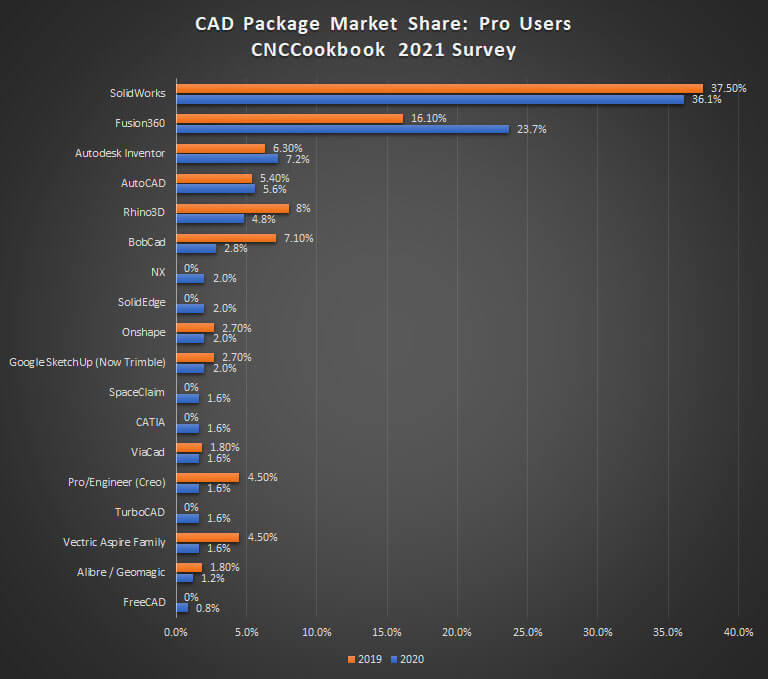
SOLIDWORKS is a 3D CAD program that companies use widely. In the 2021 CNCCookbook survey below, SolidWorks ranked first among professional users. If you can handle SOLIDWORKS, you may be able to contribute at a company quickly.
SOLIDWORKS for Makers: US$48 a year for personal use
It used to be hard for an individual to adopt, but the arrival of “SOLIDWORKS for Makers” changed that. According to the official FAQ, it costs US$48 a year or US$15 a month (excluding taxes) and is meant for personal projects and non-commercial use.
Rich in design-focused features
Fusion’s paid plan includes CAM, while SOLIDWORKS offers a wide range of features from the designer’s point of view. SOLIDWORKS for Makers includes SimulationXpress for basic strength analysis.
“SOLIDWORKS for Makers” is the low-priced way to get started with SOLIDWORKS. It is meant for personal projects and non-commercial use. The article below shows how to get started.
»How to Install SOLIDWORKS for Makers: Buy, Install, and Launch Step by Step
Side-by-Side Comparison
Here is a table summarizing the differences so far. Choose according to your own situation and goals.
| Item | Autodesk Fusion (personal use) | SOLIDWORKS for Makers |
| Main uses | Hobbies, 3D printing, design | Serious mechanical design, learning, DIY |
| Price | Free (personal, non-commercial use) | US$48 per year or US$15 per month |
| Commercial use | Personal, non-commercial use only (see the eligibility conditions above) | Non-commercial use; you may sell items you make for a profit of up to US$2,000 a year |
| CAE (simulation) | Not mentioned in Autodesk’s personal-use feature list (the paid plan includes CAE) | Basic strength analysis with SimulationXpress |
| Operating system | Windows / macOS supported | Windows only (not available for Mac) |
| Data management | Cloud-based | Cloud (3DEXPERIENCE) |
| Caveats | The personal-use version has limited functionality, such as limited import/export file types | Files are watermarked and can only be opened with a Makers license, so you can’t exchange native files with a commercial license |
Summary
I’ve covered 3D CAD programs that I recommend for beginners.
I get the impression that many people used to 2D CAD are put off by 3D CAD without having tried it. But with some modeling practice, I think it isn’t that hard to learn.
Once you get used to 3D CAD, you can create shapes just the way you imagine them, and watching them come together as an assembly is a ton of fun.
The Verdict: Which One Should You Choose?
If you can’t decide, choose by the following criteria.
“I want to start for free, no matter what,” “I use a Mac,” “I want to create smooth shapes like figurines”
→ Download Autodesk Fusion now! Start by experiencing the joy of 3D modeling for free.
“I want to become an engineer someday,” “I want skills that help with getting a job or changing jobs,” “I want to build real machines and robots”
→ SOLIDWORKS for Makers is the way to go! For an investment of a few dozen dollars a year, you get a skill that is widely used in mechanical design.
Whichever one you choose, once you master it, it becomes a tool for turning your ideas into real objects.
Start by installing whichever CAD software caught your eye and making something simple, even a cube!
Thanks for reading.