SOLIDWORKS for Makers was released by Dassault Systèmes in 2021.
Because it is available at a lower price than commercial SOLIDWORKS, it is a very attractive product for users who want to use SOLIDWORKS for personal hobbies or learning.
However, you may not know exactly what kind of product SOLIDWORKS for Makers is, and you may be hesitating over whether to buy it.
In fact, SOLIDWORKS for Makers has several differences from commercial SOLIDWORKS. Some things you can do in commercial SOLIDWORKS are restricted in SOLIDWORKS for Makers.
I’m a mechanical engineer who uses SOLIDWORKS for design work every day, and I have been a SOLIDWORKS for Makers user since it was released.
In this article, I explain what SOLIDWORKS for Makers can really do, based on my experience of continuing to use it.
After reading this article, you will know what you can and can’t do with SOLIDWORKS for Makers, and you will understand the product in more detail.
If you are interested in a low-priced SOLIDWORKS or are considering getting one, please read to the end.
What Is SOLIDWORKS for Makers?
SOLIDWORKS for Makers is officially called “3DEXPERIENCE SOLIDWORKS for Makers.”
It is a version of SOLIDWORKS for individual users that Dassault Systèmes provides directly.
It is a different product from the SOLIDWORKS sold through resellers.
To tell them apart, this article calls the SOLIDWORKS bought through a reseller “commercial SOLIDWORKS.”
How Is It Different from Commercial SOLIDWORKS?
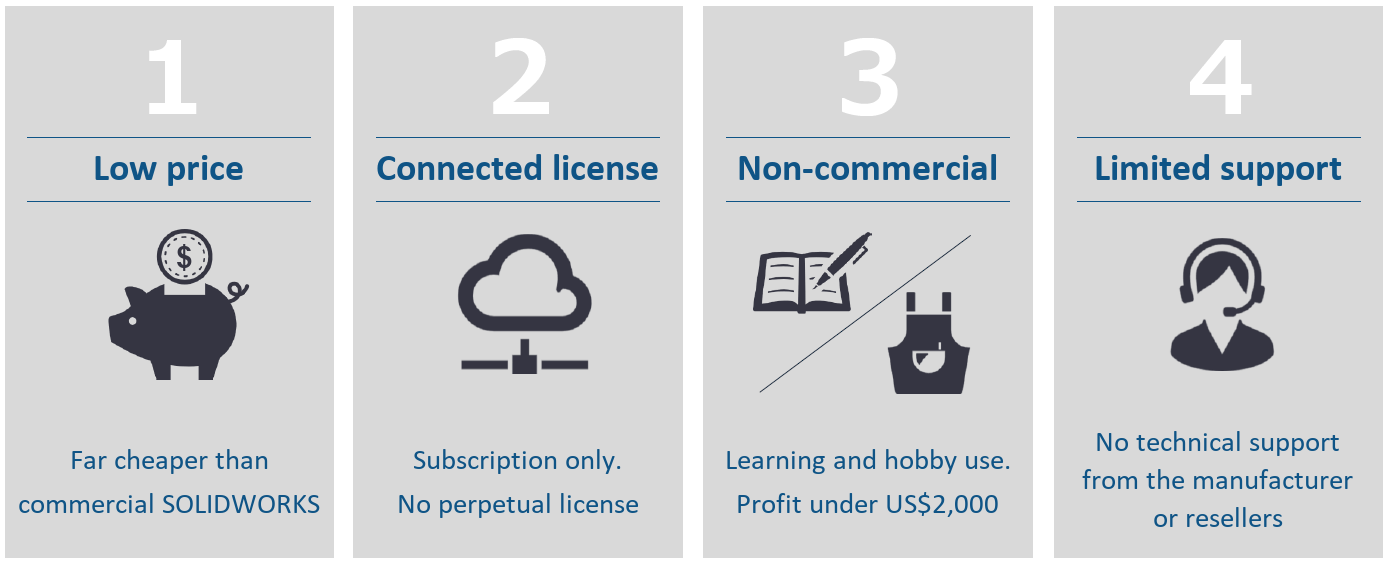
Compared with commercial SOLIDWORKS, SOLIDWORKS for Makers has the following characteristics.
- Available at a low price
- Sold only as the subscription-based Connected license
- Limited to non-commercial use
- No technical support from the manufacturer or resellers
Available at a Low Price
You can buy SOLIDWORKS for Makers at a lower price than commercial SOLIDWORKS.
Commercial SOLIDWORKS costs far more: a perpetual license is a large one-time purchase, and even the subscription-based Connected license has a much higher annual price.
SOLIDWORKS for Makers, on the other hand, costs US$15 per month or US$48 per year (excluding taxes) as of November 2026. Prices may change, so check the current price on the official website.

At launch it was US$9.99 per month or US$99 per year, but a price revision in November 2023 made it a better deal.
On top of being cheap, it sometimes goes on sale depending on the time of year.
In November 2024, it was 50% off with Black Friday pricing.
Sold Only as the Subscription-Based Connected License
Commercial SOLIDWORKS has two kinds of licenses: the perpetual Desktop license and the subscription-based Connected license.
SOLIDWORKS for Makers is a Connected license. There is no perpetual Desktop license.
You subscribe either monthly or yearly.
Because the price is low, it is easy to try it for just one month.
It also works the same way as the Connected license, so you need an internet connection to use it.
Limited to Non-Commercial Use
SOLIDWORKS for Makers is limited to non-commercial use.
That means it is mainly for personal hobby projects and learning.
Please note that you cannot run a business with SOLIDWORKS for Makers.
Limited Support
With SOLIDWORKS for Makers, you can’t get technical support from the manufacturer or resellers.
If something goes wrong, you need to solve it yourself.
You look through the FAQ on the SOLIDWORKS website or research it on your own, or you ask the support community for advice.
SOLIDWORKS for Makers is a product you buy directly from its provider, Dassault Systèmes, not through a reseller.
To get started, you need to buy it yourself and install it yourself from the Dassault Systèmes website.
This blog also has an article that walks you through getting started with SOLIDWORKS for Makers, so please take a look.
»How to Install SOLIDWORKS for Makers: Buy, Install, and Launch Step by Step
What You Can Do with SOLIDWORKS for Makers
Here is what you can mainly do with SOLIDWORKS for Makers.
- Create models and drawings in the latest version of SOLIDWORKS
- Use 3DEXPERIENCE applications and storage
- Render with SOLIDWORKS Visualize
- Run strength analysis with SimulationXpress
With SOLIDWORKS for Makers you mainly get the same functions and tools as the 3DEXPERIENCE SOLIDWORKS Professional license.
Create Models and Drawings in the Latest Version of SOLIDWORKS
With SOLIDWORKS for Makers you can do modeling and create drawings just as in commercial SOLIDWORKS.
You can create 3D models of parts and assemblies, and create drawings from those models.
In addition, like the Connected license of commercial SOLIDWORKS, SOLIDWORKS for Makers always lets you use the latest version of SOLIDWORKS.
New features that are added and updated from time to time are available right away.
When you launch SOLIDWORKS for Makers, you get announcements about new versions from time to time, and you can update with just a click.
You can also use convenient features included in the Professional license, such as Toolbox.
Use 3DEXPERIENCE Applications and Storage
When you buy SOLIDWORKS for Makers, you can use both the applications and the cloud storage of 3DEXPERIENCE.
There are many 3DEXPERIENCE applications, so here are a few of them.
- 3D modeling in the browser (xDesign, xShape)
- Checking the design progress, revisions, and derived parts of each part and assembly
- Leaving review comments for collaborators while looking at the 3D model
- Creating a BOM from the parts in an assembly
- Creating CAM data for parts and checking machining in CAM (NC Shop Floor Programmer)
- Sharing collaborators’ task progress and information
- Comparing parts you created, and more
3DEXPERIENCE applications are browser-based.
That means you can use these applications from any device without installing anything.
You don’t need a workstation. You can use them from a tablet or a smartphone too.
3DEXPERIENCE applications are especially strong in collaboration features, and many of them are useful when you build things as a team.
Sharing information and exchanging opinions within the team can all happen on one platform, which is very convenient.
Working alone gives you complete freedom and is fun, but with 3DEXPERIENCE you can also experience the satisfaction of creating together as a team.
With SOLIDWORKS for Makers, you can use all of the 3DEXPERIENCE platform’s functions and tools for making things.
What I find interesting about Makers is that, for your own creative projects, you can use exactly the same functions and tools as a professional production team.
Render with SOLIDWORKS Visualize
With SOLIDWORKS for Makers you can render with SOLIDWORKS Visualize Connected.
By adding material textures and lighting to a 3D model, you can create photo-quality images.
SOLIDWORKS Visualize is a paid app if you buy it on its own, but it is also included in the SOLIDWORKS for Makers package.
Run Strength Analysis with SimulationXpress
With SOLIDWORKS for Makers you can also do strength analysis with SimulationXpress.
SimulationXpress itself is a built-in SOLIDWORKS feature, but when Makers was first released it was not available.
As of December 2023, however, SimulationXpress became available, and SOLIDWORKS for Makers users can now run strength analysis.
You can’t do advanced analysis, but you can run simple linear analysis of a part.
They keep adding features that individual users ask for.
I get the feeling that Dassault Systèmes values individual users too.
What You Can’t Do with SOLIDWORKS for Makers
SOLIDWORKS for Makers has almost the same functions as commercial SOLIDWORKS, but some things are restricted.
The following three points are the main ones.
- Files created in Makers can’t be opened in commercial SOLIDWORKS
- Technical support from the manufacturer or resellers
- Earn more than US$2,000 in profit
Files Created in Makers Can’t Be Opened in Commercial SOLIDWORKS
Files created in SOLIDWORKS for Makers can’t be opened in commercial SOLIDWORKS.
If you try to open a file created in SOLIDWORKS for Makers with commercial SOLIDWORKS, you get an error message and the file does not open.
Conversely, you can open a file created in commercial SOLIDWORKS in SOLIDWORKS for Makers.
Please note that a file (part, assembly, drawing, and so on) that you have saved in Makers even once can no longer be opened in commercial SOLIDWORKS.
To be precise, it is SOLIDWORKS native files that can’t be read.
Native files are SOLIDWORKS-specific file formats, with extensions such as “.SLDPRT,” “.SLDASM,” and “.SLDDRW.”
Native files can’t be read, but if you convert them to a neutral file format, commercial SOLIDWORKS can read them.
If you export the Makers file as STEP or Parasolid, import it into commercial SOLIDWORKS, and run feature recognition, you can read it in commercial SOLIDWORKS, at least in a roundabout way.
Technical Support from the Manufacturer or Resellers
As described in the differences from commercial SOLIDWORKS, you can’t get technical support from the manufacturer or resellers with SOLIDWORKS for Makers.
SOLIDWORKS for Makers is a product for individuals. You buy it directly from Dassault Systèmes, not through a reseller, and install it yourself from the Dassault Systèmes website.
When you have a problem, you post a question to the Maker Support community, a community of Makers users, and get advice.
The Maker Support community is message-based.
There is a time lag before you get an answer.
But other users in the community often share useful advice.
When I don’t understand something, I ask in the Maker Support community too.
Earn More Than US$2,000 in Profit
SOLIDWORKS for Makers is a product limited to non-commercial use.
That means you can’t use SOLIDWORKS for Makers for business.
The official website states that if you earn more than US$2,000 a year in profit with SOLIDWORKS for Makers, you are no longer eligible to use it, so please be careful.
Please use the product in line with the terms.
Let’s all follow the rules and keep enjoying SOLIDWORKS.
Summary
This article explained the differences between SOLIDWORKS for Makers and commercial SOLIDWORKS, and what you can and can’t do with SOLIDWORKS for Makers.
SOLIDWORKS for Makers differs from commercial SOLIDWORKS in some ways, but you can use almost the same functions at a very low price.
I think it is a very good product for anyone who wants to enjoy SOLIDWORKS personally.
With SOLIDWORKS for Makers, both your hobby and your day job get more fun. (Just my personal view.)
If you want to get started with SOLIDWORKS for Makers, the article below explains the steps in detail.
»How to Install SOLIDWORKS for Makers: Buy, Install, and Launch Step by Step
Thank you for reading to the end.